


TruePlayer is a WordPress video and audio player by Kodezen that plays your media beautifully, proves whether a viewer genuinely watched it, locks the video when someone fails a quiz, and keeps your other tools updated automatically — all from your WordPress dashboard.
Before You Start
Make sure your site meets these requirements:
|
Requirement |
Minimum |
|
WordPress |
6.4 or newer |
|
PHP |
7.4 or newer |
|
Tested up to |
WordPress 6.7 |
No other plugin is required. TruePlayer works on its own.
How to Install and Activate TruePlayer Free
Follow the steps below to install TruePlayer Free from the WordPress plugin repository.
Navigate to Add New Plugin
From your WordPress dashboard, go to:
Plugins → Add New Plugin
Install the Plugin
Click the “Install Now” button on the TruePlayer plugin card. WordPress will download and install the plugin automatically.
Activate the Plugin
After installation is complete, click “Activate”. TruePlayer will now be active on your site.
Confirm Activation
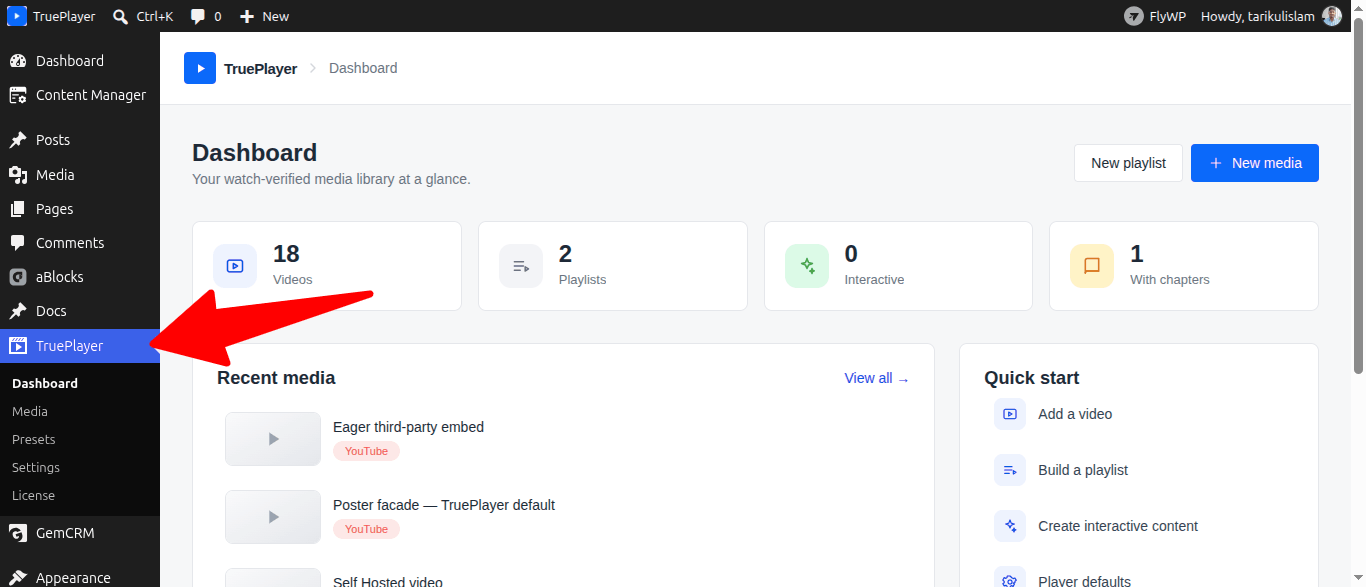
You will now see a TruePlayer menu item in your WordPress left sidebar, with four sections underneath it: Dashboard, Media, Presets and Settings.
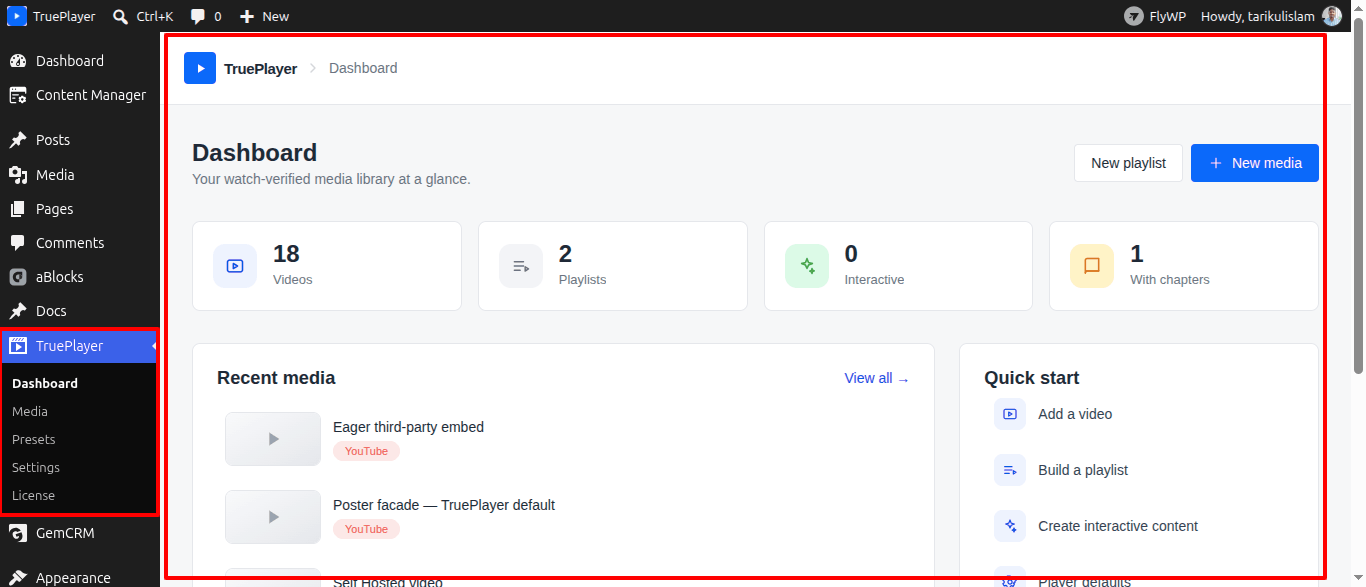
The Free version is fully ready to use — no license key is needed.
What happens on activation: TruePlayer quietly creates the database tables it needs to store watch progress and quiz results. Nothing is added to your posts or pages, and no content is changed.
TruePlayer Free is now installed and active. You can start using it immediately — head to Create Your First Video.
If you have purchased TruePlayer Pro, continue to Part 2 below.
How to Install and Activate TruePlayer Pro
If you have already completed Part 1, TruePlayer Free is active on your site. Now follow the steps below to install TruePlayer Pro on top of it and activate your license key.
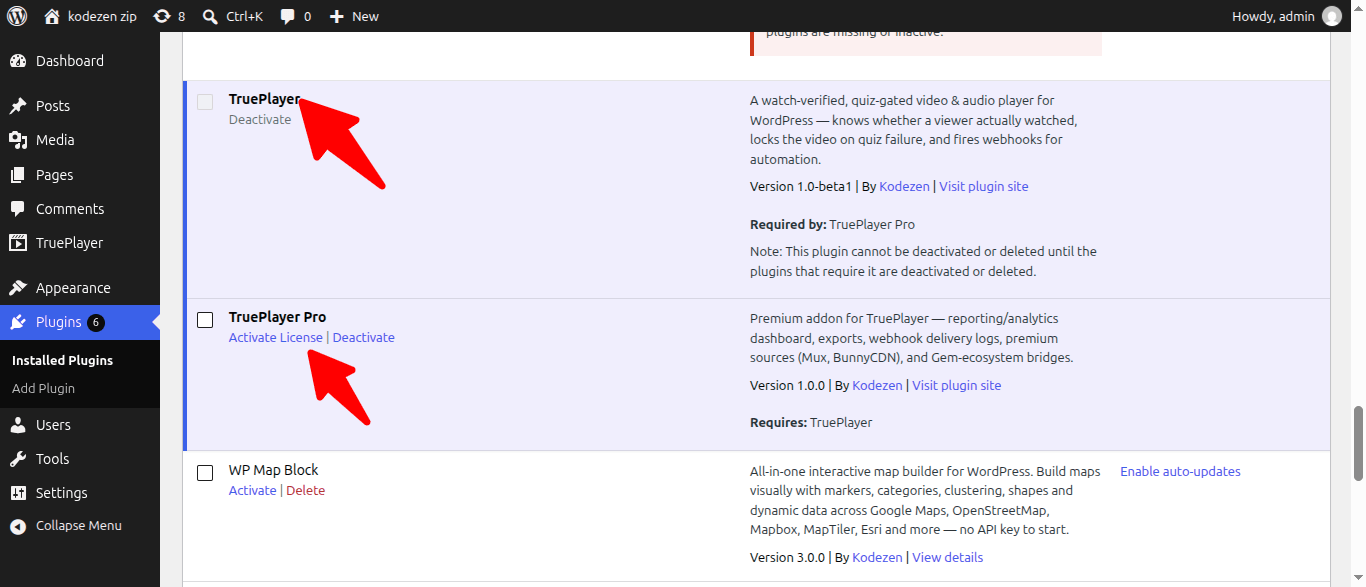
Important: Do not deactivate or delete TruePlayer Free. Both TruePlayer and TruePlayer Pro must be active at the same time for the plugin to work correctly. Pro is an add-on to the free player, not a replacement for it.
Purchase TruePlayer Pro
Visit kodezen.com/trueplayer and complete your purchase.
After a successful payment, Kodezen will send a welcome email to your registered email address containing your login email and password. Use these credentials to log in to your Kodezen account.
Log In to Your Kodezen Account and Download TruePlayer Pro
- Visit your Kodezen store account and log in using the credentials from your welcome email.
- After logging in, you will be taken to your account dashboard.
- Locate TruePlayer Pro under your purchases and click the Download button to save the ZIP file to your computer.

Step 3: Upload and Install TruePlayer Pro in WordPress
TruePlayer Free is already active on your site. You will now install TruePlayer Pro as a separate, additional plugin alongside it. Do not remove or deactivate the Free version during this process.
- Log in to your WordPress admin panel.
- Navigate to: Plugins → Add New Plugin
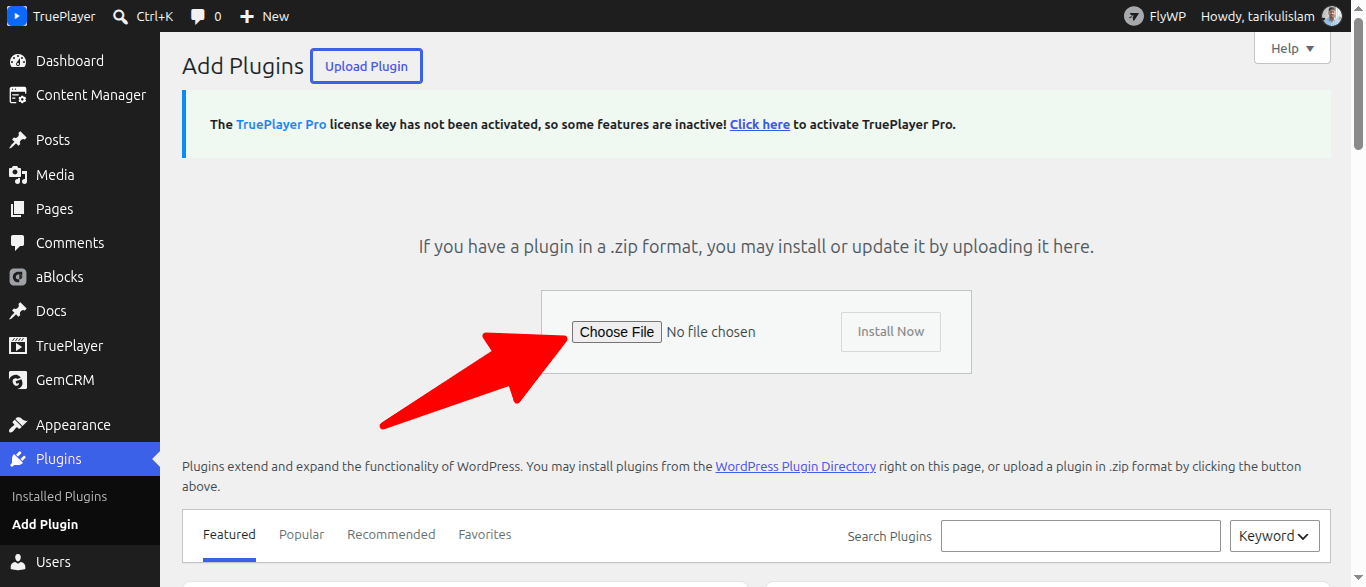
- Click the “Upload Plugin” button at the top of the page.
- Click “Choose File” and select the TruePlayer Pro ZIP file you downloaded. Then click “Install Now”.
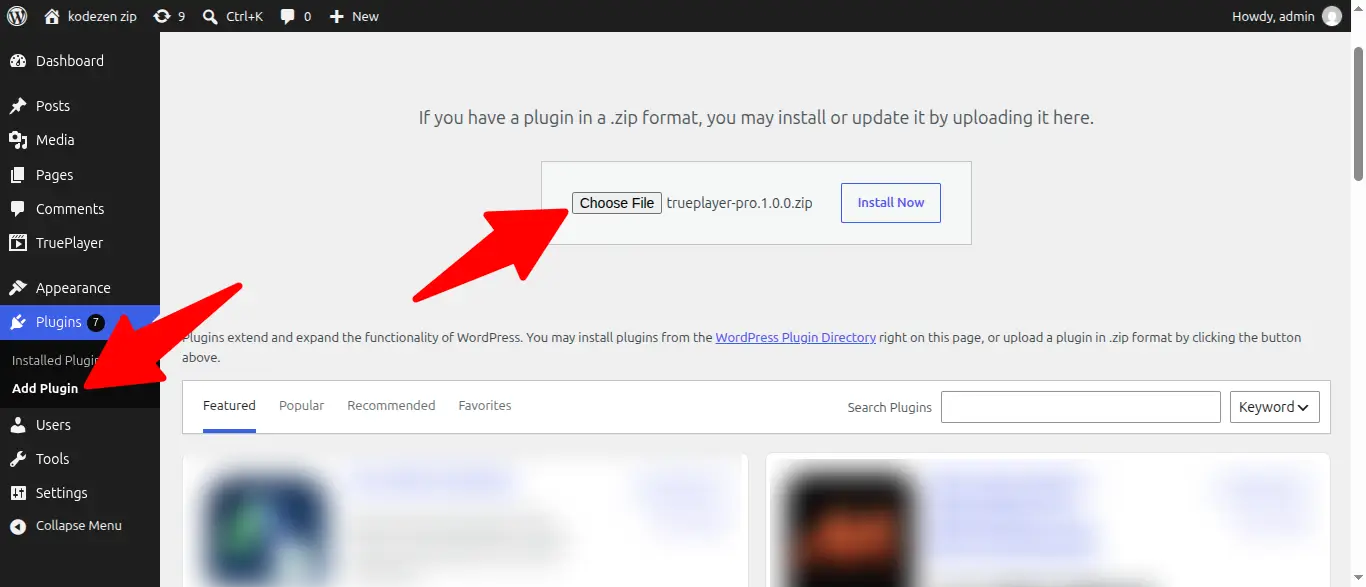
- After installation is complete, click “Activate Plugin”.
After this step, go to Plugins → Installed Plugins. You should see both TruePlayer and TruePlayer Pro listed, and both showing as Active.
Copy Your TruePlayer Pro License Key
- Return to your Kodezen store account.
- From your dashboard, click on the License Keys section in the sidebar.
- Your TruePlayer Pro License Key will be displayed on this page. Click to copy it.
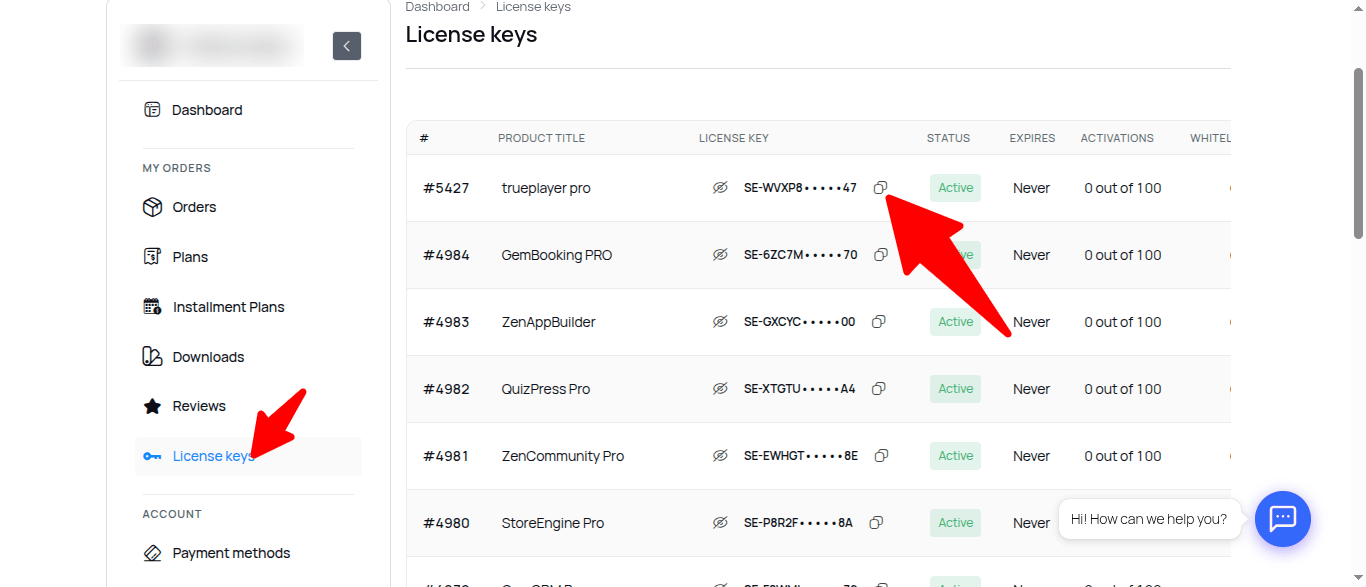
Your license key is a unique alphanumeric string. Do not share it publicly or use it on more sites than your plan allows.
Enter and Activate the License Key
The license panel belongs to the Pro plugin, so you will find it with the plugin itself:
- In your WordPress admin, go to Plugins → Installed Plugins.
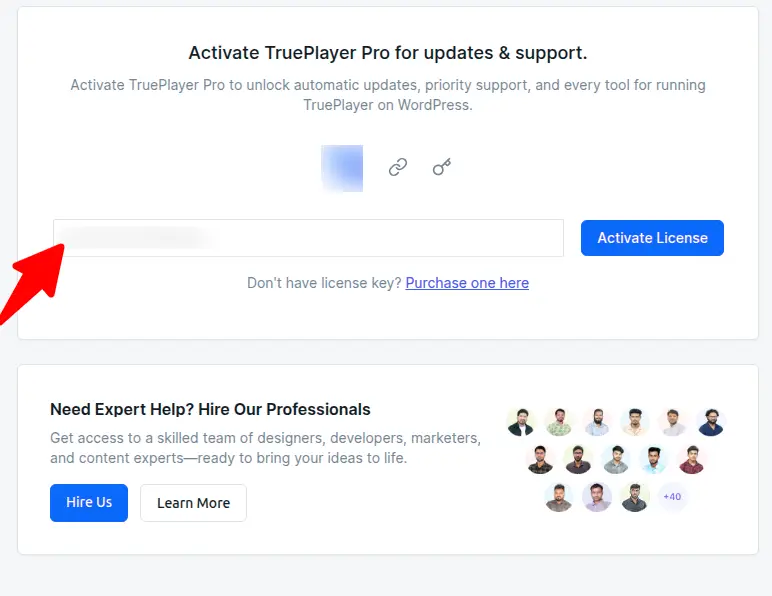
- Find TruePlayer Pro and open its License panel.
- Paste the license key you copied from your Kodezen dashboard into the License Key field.
- Click “Activate License”.
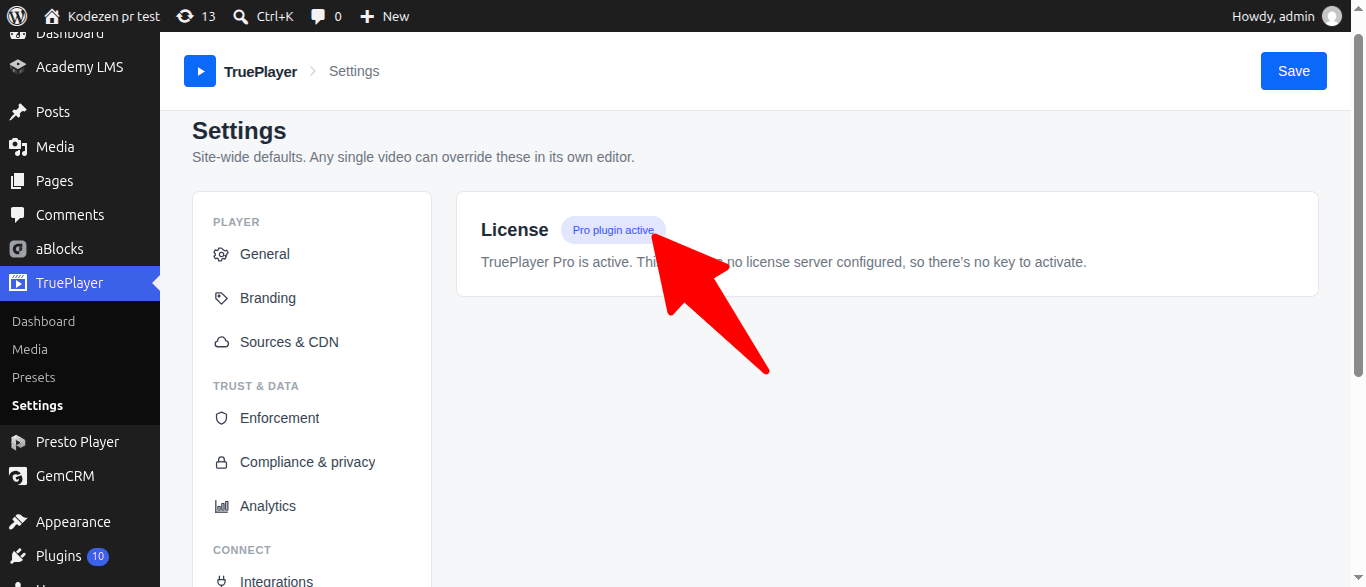
Confirm Pro Is Active
In your WordPress sidebar, go to:
TruePlayer → Settings → License
You should see a green “Pro active” badge, confirming that your license is valid and all Pro features are unlocked.
Frequently Asked Questions
Do I need TruePlayer Free if I bought Pro?
Yes. Pro is an add-on that sits on top of the free plugin. Both must be installed and active.
Do I lose my videos if I deactivate the plugin?
No. Your players, playlists, presets and settings are stored in your WordPress database and are still there when you reactivate.
Can I move my license to another site?
Yes, within the limits of your plan. Deactivate the license on the old site first, then activate it on the new one.
Nothing appeared in my sidebar after activating?
The TruePlayer menu is only visible to users who can manage plugin options — usually an Administrator. Check that you are logged in with an Administrator account.
Do I need to configure anything before using it?
No. TruePlayer works with sensible defaults out of the box. See First-Time Setup for the handful of things worth setting once.