


Protection makes your video harder to copy, download and share.
Requires TruePlayer Pro.
Find it at: Media item → Access & gating → Protection
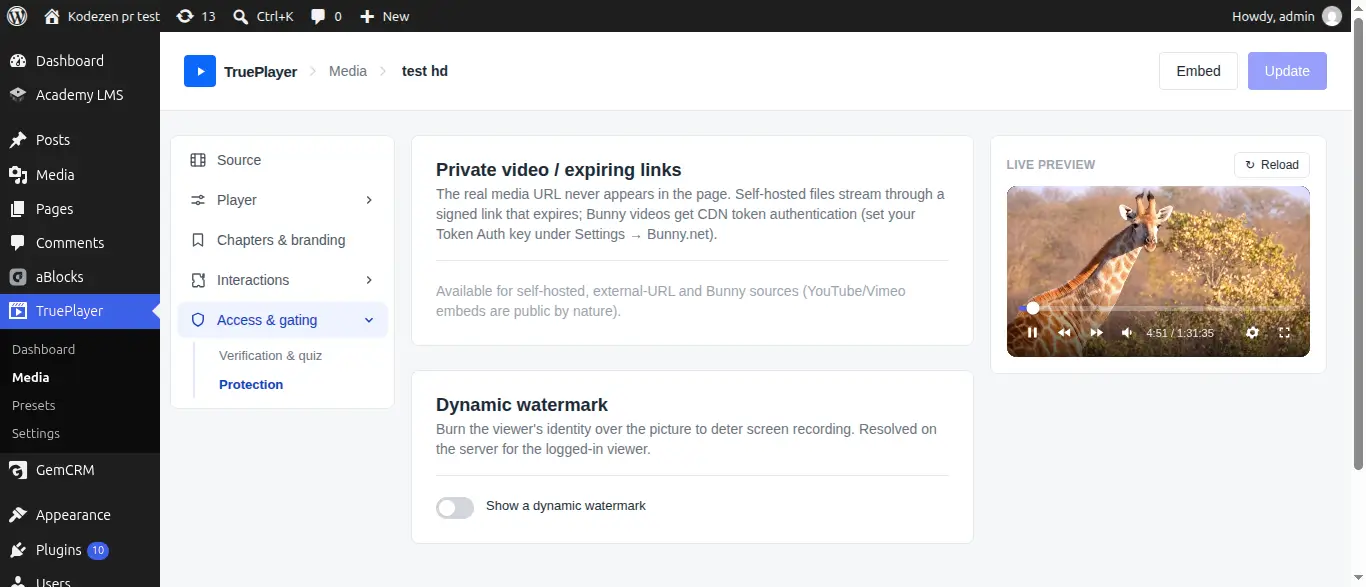
What Protection Does
Two independent features:
|
Feature |
What it stops |
|
Private video with signed links |
Someone finding your video file’s real address and sharing it |
|
Dynamic watermark |
Someone screen-recording and redistributing your video anonymously |
They work well together: one makes the file hard to take, the other makes taking it risky.
Private Video with Signed Links
Normally, a self-hosted video’s address is visible in your page’s source. Anyone who finds it can download the file or post the link somewhere else.
With private video on, TruePlayer replaces that address with a signed, expiring link.
How It Works
- The real file address never appears in your page at all.
- Each viewer gets a temporary link that works only for them.
- The link stops working after a few hours.
- A leaked link is useless by the time it spreads.
Step 1: Turn It On
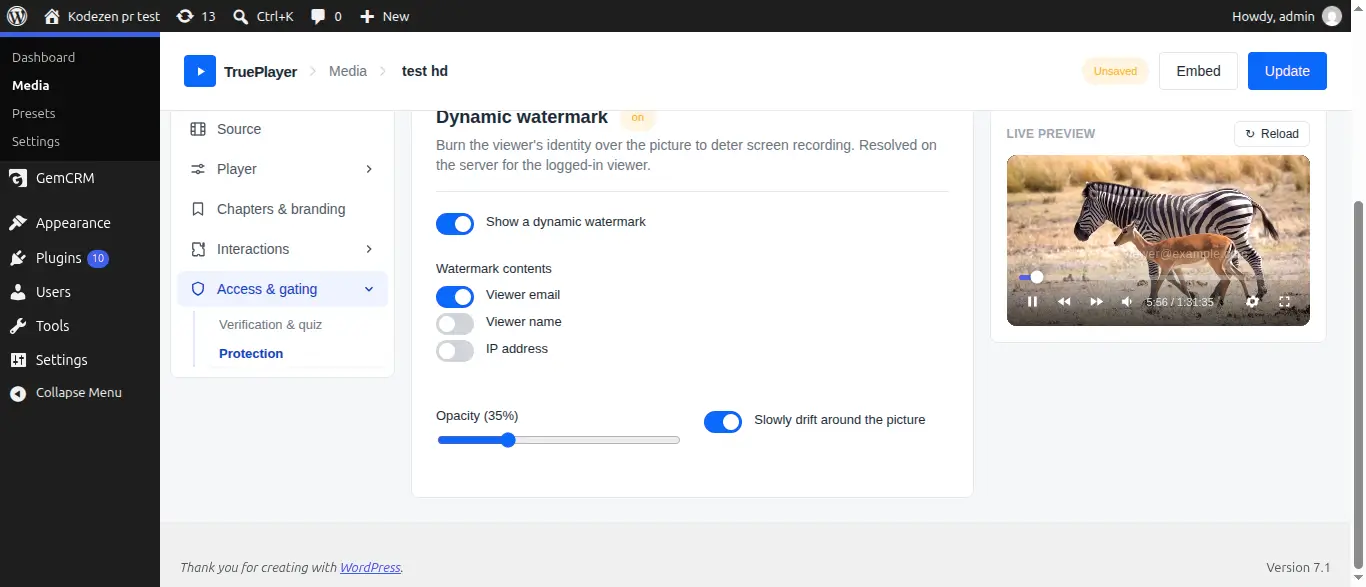
Open your media item → Access & gating → Protection, and enable Serve this video through signed, expiring links.
Step 2: Set the Expiry
Go to TruePlayer → Settings → Sources & CDN and set Expiry (hours). The default is 6 hours.
- Shorter is more secure, but a viewer who leaves a long video open may need to reload.
- Longer is more forgiving.
6 hours suits most content.
Seeking still works normally with signed links. The protection is invisible to legitimate viewers.
Bunny.net Token Authentication
If your video is hosted on Bunny.net, add your Token Authentication Key under Settings → Sources & CDN and TruePlayer will generate protected CDN links in the same way.
Dynamic Watermark
Burns the viewer’s own identity onto the picture — their email address, name or IP address.
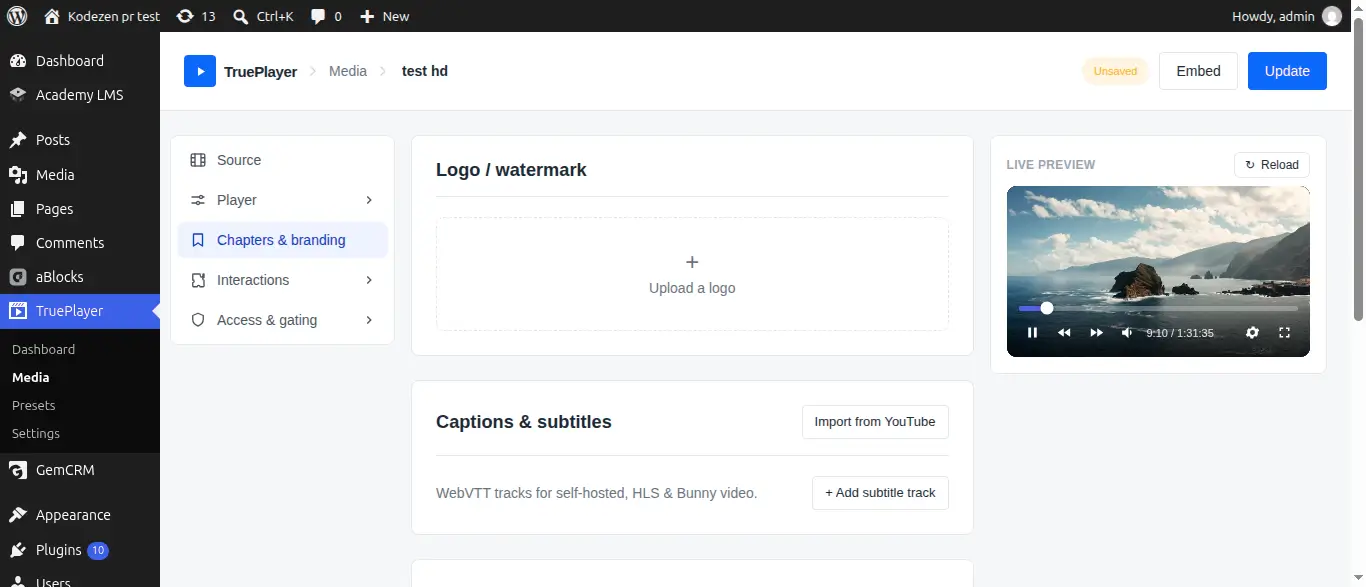
This is the single most effective deterrent against screen recording, because any copy that appears elsewhere identifies exactly who leaked it.
Step 1: Turn It On
In the Protection section, enable Show a dynamic watermark.
Step 2: Choose the Contents
|
Field |
Shows |
|
|
The viewer’s email address |
|
Name |
Their display name |
|
IP |
Their IP address |
You can combine them.
Step 3: Set the Behaviour
|
Setting |
What it does |
|
Opacity |
How visible the watermark is |
|
Slowly drift around the picture |
Moves the watermark so it cannot simply be cropped out |
Getting the opacity right: visible enough to read in a recording, subtle enough not to spoil the video. Around 30–40% is usually the sweet spot. Test it on your own footage.
The identity is decided on your server, not by the browser. A viewer cannot change what the watermark says by tampering with the page.
Pair it with Require login. A watermark showing an email address only works if TruePlayer knows who is watching. For anonymous visitors there is nothing to show, so this feature belongs with login-required content.
Other Ways to Restrict Access
Protection covers copying. To control who can watch at all:
|
Goal |
Where |
|
Only logged-in users |
Access & gating → Require login to watch |
|
Only enrolled students |
Access & gating → Course completion → Block playback for non-enrolled viewers |
|
Not available until a date |
Access & gating → drip release date |
|
Only people who pass a quiz first |
What Protection Cannot Do
Being straight with you about the limits:
- Nothing can stop a camera pointed at a screen. No video platform on earth solves this. The watermark is a deterrent, not a barrier.
- Screen recording software can still record. Again, the watermark makes it traceable rather than impossible.
- A determined technical viewer can capture a stream. Signed links raise the effort substantially, but they are not encryption.
What protection does achieve is making casual copying and sharing impractical, and making deliberate copying attributable. For almost all real-world content, that is what matters.
Frequently Asked Questions
Does private video slow playback down?
No. The video streams normally, including seeking
Do signed links work with YouTube or Vimeo?
No. Those platforms serve their own video, so their rules apply. Private video is for self-hosted files and Bunny.net.
What happens when a link expires mid-video?
Reloading the page issues a fresh link. Setting a longer expiry avoids the situation for long videos.
Can I watermark for logged-out visitors?
There is no identity to show, so the watermark has nothing useful to display. Use it with Require login to watch.
Will the watermark appear in fullscreen?
Yes.
Does the watermark affect video quality?
No. It is drawn over the video by the player and never touches your file.