


Watch verification is what makes TruePlayer different from an ordinary video player. It answers a question most players cannot: did this person actually watch it?
Requires TruePlayer Pro.
The Problem It Solves
Most players count a view the moment someone presses play. Someone can open your 40-minute compliance video, drag the slider to the end, and be recorded as complete in four seconds.
If you are issuing certificates, gating a course, or proving that staff completed training, that number is worthless.
How Coverage Works
TruePlayer records which parts of the video were actually played, second by second, and adds them up. That total is called coverage.
A 10-minute video
Viewer A: watches 0:00 → 9:00 straight through → 90% coverage ✅
Viewer B: presses play, drags to 9:59, stops → 1% coverage ❌
Viewer C: watches 0:00 → 3:00, skips to 7:00,
watches to 10:00 → 60% coverage
Three things make this reliable:
- Skipping does not fill in gaps. Jumping from 3:00 to 7:00 leaves those four minutes uncounted, permanently, until they are actually played.
- The counting happens on your server, not in the visitor’s browser. The browser reports what it played; your site decides what to believe.
- There is a speed limit. A viewer cannot claim more watched time than has actually passed in real life, so scripts and tricks that try to fast-forward progress get trimmed automatically.
Re-watching a section does not inflate the number either. Coverage counts distinct parts of the video, so watching the first minute ten times still gives you one minute of coverage.
Turn On Watch Verification
Watch verification is active for every video as soon as TruePlayer Pro is licensed. What you configure is how strict it is.
Site-wide
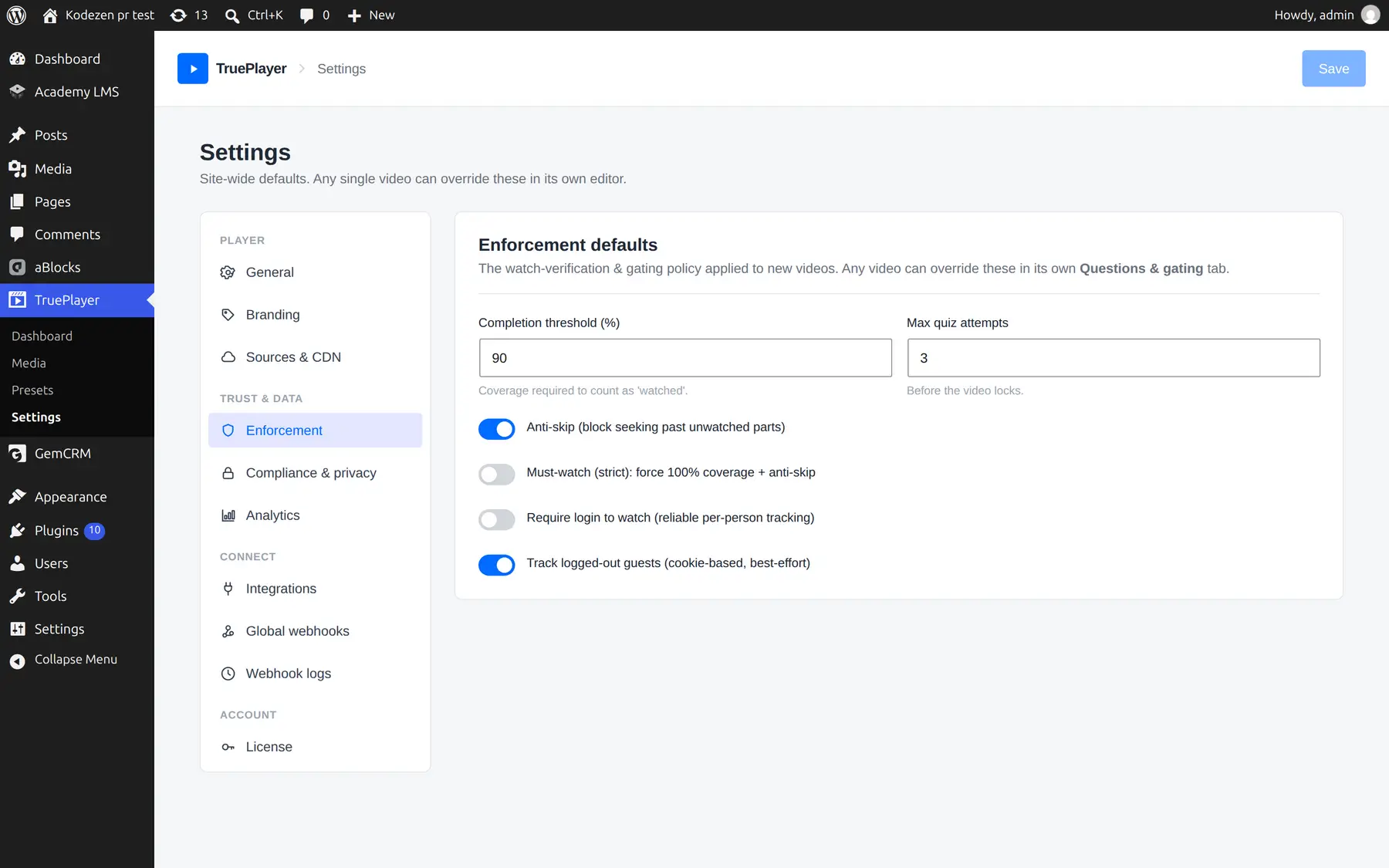
Go to: TruePlayer → Settings → Enforcement
For one video
Open the media item → Access & gating → Verification & quiz
A video’s own settings override the site-wide ones.
The Settings Explained
|
Setting |
Default |
What it does |
|
Completion threshold (%) |
90 |
How much coverage counts as “watched” |
|
Max quiz attempts |
3 |
How many quiz failures before the video locks |
|
Anti-skip |
On |
Blocks seeking past unwatched parts |
|
Require login to watch |
Off |
Anonymous visitors must log in first |
|
Track logged-out guests |
On |
Whether anything is stored for anonymous visitors |
Choosing a threshold. 90% is right for most content — it allows for someone stopping just before the credits. Use 100% only when you genuinely mean every second, and pair it with anti-skip.
Anti-Skip
With anti-skip on, viewers can rewind and rewatch freely, but they cannot jump forward past the furthest point they have genuinely reached.
This is a different thing from Disable the timeline entirely (in Player → Behaviour), which removes seeking in both directions. Anti-skip is usually the better choice: it stops people skipping ahead without stopping them going back to review something.
Must-Watch (Strict)
A single switch in Settings → Enforcement that forces 100% coverage and anti-skip everywhere, regardless of what individual videos say.
Use it for compliance, safety and certification training, where “mostly watched” is not good enough and you want one control that cannot be weakened by accident on a single video.
Guests vs Logged-In Viewers
|
Logged-in viewer |
Anonymous guest |
|
|
Identified by |
Their WordPress account |
A cookie in their browser |
|
Reliable? |
Yes |
Best-effort |
|
Survives clearing cookies? |
Yes |
No |
|
Follows them across devices? |
Yes |
No |
|
Shows a name and email? |
Yes |
No |
If you need dependable records — certificates, compliance evidence, course completion — turn on Require login to watch. It is the only way to be certain who watched what.
If you would rather not track anonymous visitors at all, turn off Track logged-out guests. Guests can then still watch freely; nothing is stored for them.
Frequently Asked Questions
Can someone cheat the tracking?
It is built to make the obvious methods fail. Skipping does not fill gaps, the checking happens on your server rather than in the browser, and there is a limit on how much progress can be claimed in a given amount of real time. No system is perfect, but dragging the slider, speeding up playback and tampering with the page do not work.
Does watching at 2× speed still count?
Yes — those parts were genuinely played. What is prevented is claiming more watched time than has actually elapsed.
Does leaving the video playing in a background tab count?
The parts that play do count. If you need proof of attention rather than playback, add checkpoint questions — see Quiz Gating & Locking.
Where do I see the results?
In each video’s Analytics screen: coverage per viewer, plus a retention curve showing where people drop off.
Does verification work with YouTube and Vimeo?
Yes. Tracking is part of your player, so it works with every source type.
Can I reset someone’s progress?
Yes — open the video’s Analytics, find the viewer and click Reset / unlock.